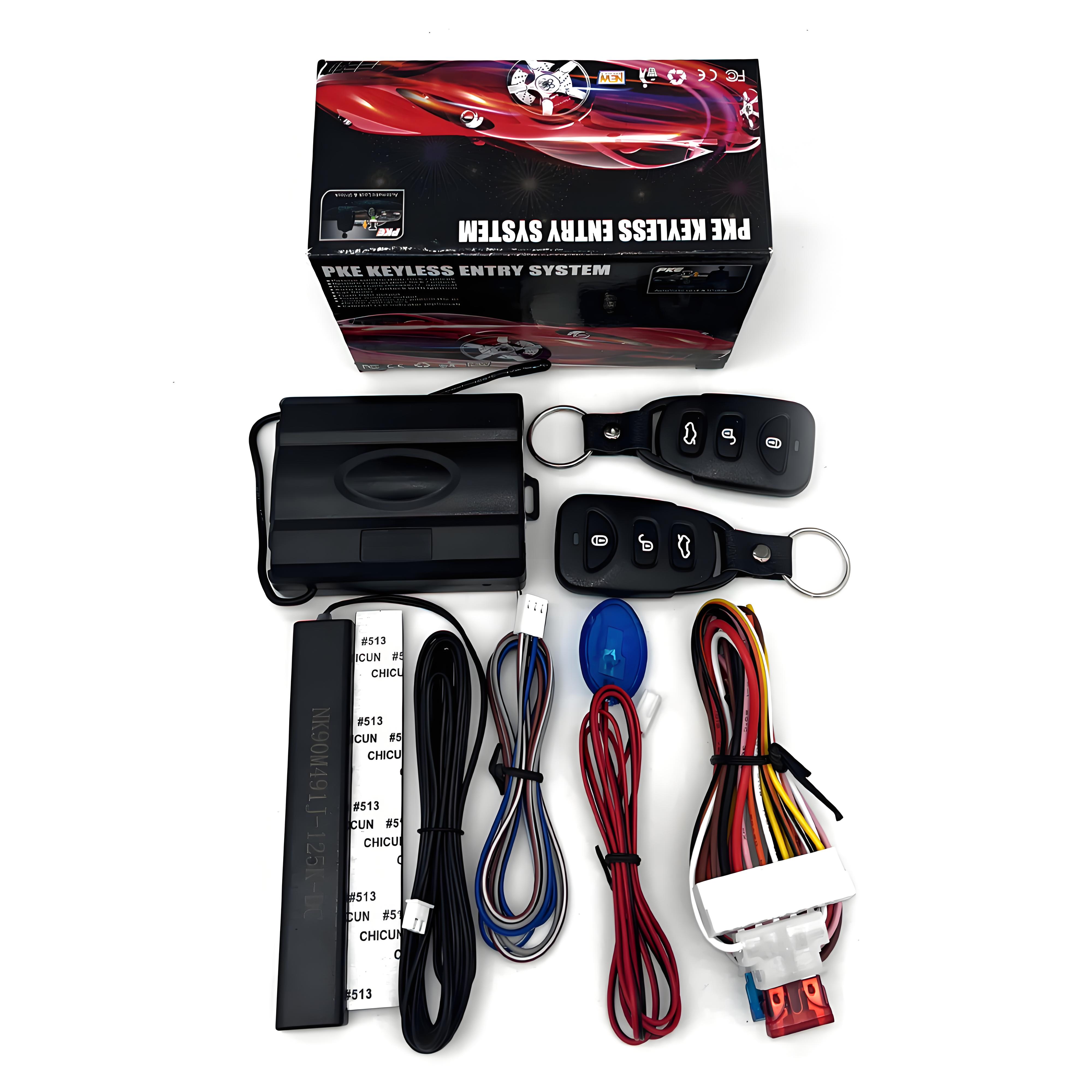
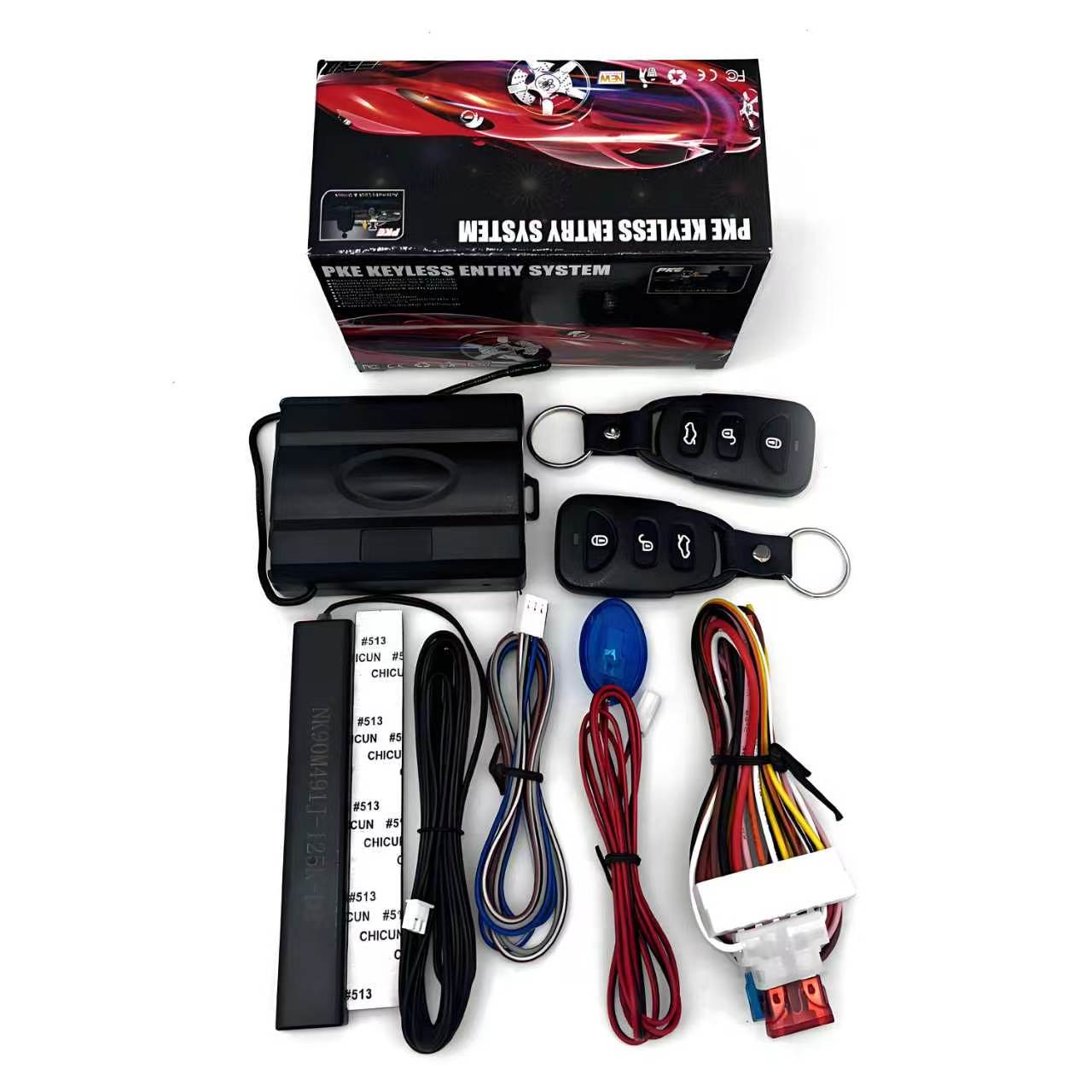
EFHIPS standalone PKE keyless entry kit with controller, two remotes and wiring harnesses
EFHIPS / Standalone vehicle access

Passive Keyless Entry & Automatic Door Locks

Walk up to unlock. Walk away to lock. Upgrade compatible conventional door-lock systems with a standalone PKE controller while keeping your original ignition key.

PKE Auto UnlockWalk-Away Auto Lock2 Smart Remotes6-Wire Relay Outputs
From $59.90 USD

Choose Standard PKE ($59.90) or Bluetooth PKE ($69.90). Verify vehicle compatibility before ordering.

Standard PKE
$59.90 USD

Automatic lock / unlock · 2 remotes

Choose Standard
Bluetooth PKE
$69.90 USD

All Standard features + Bluetooth app

Choose Bluetooth
Compare both versions and product photos ↓
Important compatibility & installation notice

This is a universal wired door-lock controller, not a vehicle-specific plug-and-play kit or CAN Bus interface. It does not add push-button or remote engine start. Vehicle power, lock/unlock and relevant ignition-state circuits must be identified and connected correctly. Some vehicles need an additional interface. Incorrect connections can damage the vehicle’s BCM. Professional installation recommended.

15 functions, clearly explained

Based on the supplied product feature list and operating instructions. Optional features require suitable vehicle wiring and may not be available on every vehicle.

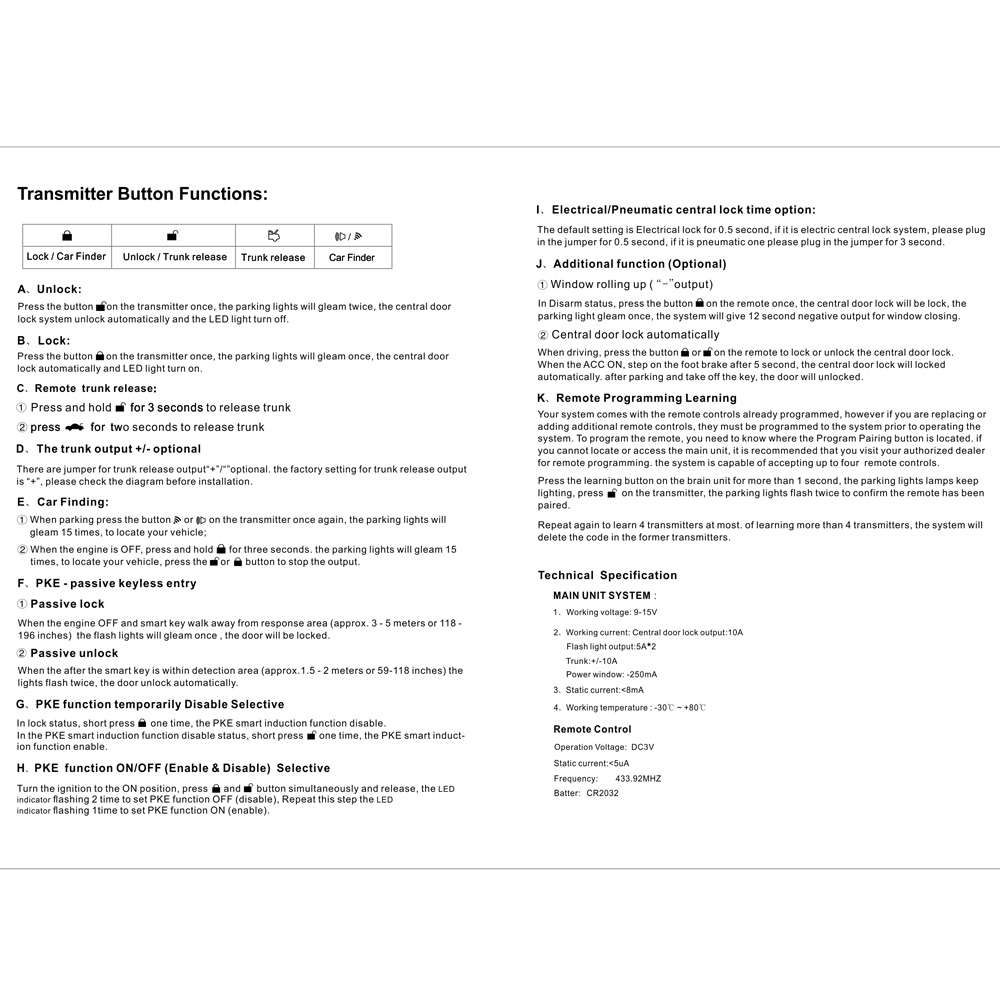
01. Hands-free passive unlock

With the engine off, the smart remote entering the detection zone (approximately 1.5–2 m / 59–118 in) triggers automatic unlocking and two parking-light flashes.

02. Walk-away passive lock

When the engine is off and the smart remote moves outside the response area (approximately 3–5 m / 118–196 in), the doors lock automatically and the parking lights flash once.

03. Manual remote lock / unlock

Press the remote lock button to lock with one parking-light flash, or unlock to unlock with two flashes. Remote commands work independently of normal passive entry.

04. Remote trunk-release output

The remote offers trunk-release control. The trunk output polarity is selectable positive or negative (default negative); actual trunk integration depends on the vehicle.

05. Car finder / parking light output

Use the remote car-finder command to flash the parking lights for approximately 15 seconds. Parking-light outputs also provide visual confirmation for locking and unlocking.

06. Built-in six-wire central locking relays

Six door-lock relay wires support conventional negative-trigger, positive-trigger, mixed, single-wire and reverse-polarity wiring arrangements shown in the manual. Not a direct CAN Bus interface.

07. Driving auto-lock / ignition-off unlock

The manual describes optional automatic locking while driving and unlocking after ACC is switched off, with timing based on the selected operation and required vehicle-state wiring.

08. PKE function enable / disable

PKE sensing can be temporarily disabled from the remote. The manual also describes a separate ignition-on remote-button sequence to enable or disable PKE.

09. Selectable lock pulse time

Default electric-lock pulse is 0.5 second. A jumper can select a 3-second pulse for pneumatic central locking systems.

10. Window closing signal

Optional negative output for compatible window-closing control equipment. Additional vehicle-specific interfaces may be necessary.

11. Status LED indicator

The status LED flashes while locked/armed and turns off when unlocked/disarmed, according to the product description.

12. Remote learning

The controller can learn up to four remotes using its learning switch and the manual programming procedure.

13. Flexible lock control wiring

Nine door-lock wiring diagrams cover several common relay/actuator control methods. The installer must identify the correct circuit and verify polarity before connection.

14. Two smart remotes included

Two three-button remote fobs are shown in the supplied product kit, each providing lock, unlock and trunk controls.

15. Original ignition remains unchanged

This is a door-access system, not a push-button start conversion. The vehicle retains its existing ignition key and immobilizer.
Approach. Unlock. Walk away. Lock.

01 · Approach the vehicle

With the engine off, carry the smart remote into the approximately 1.5–2 m response area. The controller sends an unlock command and flashes the parking lights twice.

02 · Use your original key

Enter and drive as usual. Your factory chip key and original ignition system remain responsible for engine starting.

03 · Walk away

When the engine is off and the remote moves approximately 3–5 m away, the system commands the doors to lock and flashes the parking lights once.

Detection distances are approximate and may vary with antenna placement, interference, vehicle body construction and operating conditions.

See EFHIPS 239 in Action

Watch the passive keyless entry system demonstrate automatic unlocking and walk-away locking.

Built for conventional central locking circuits

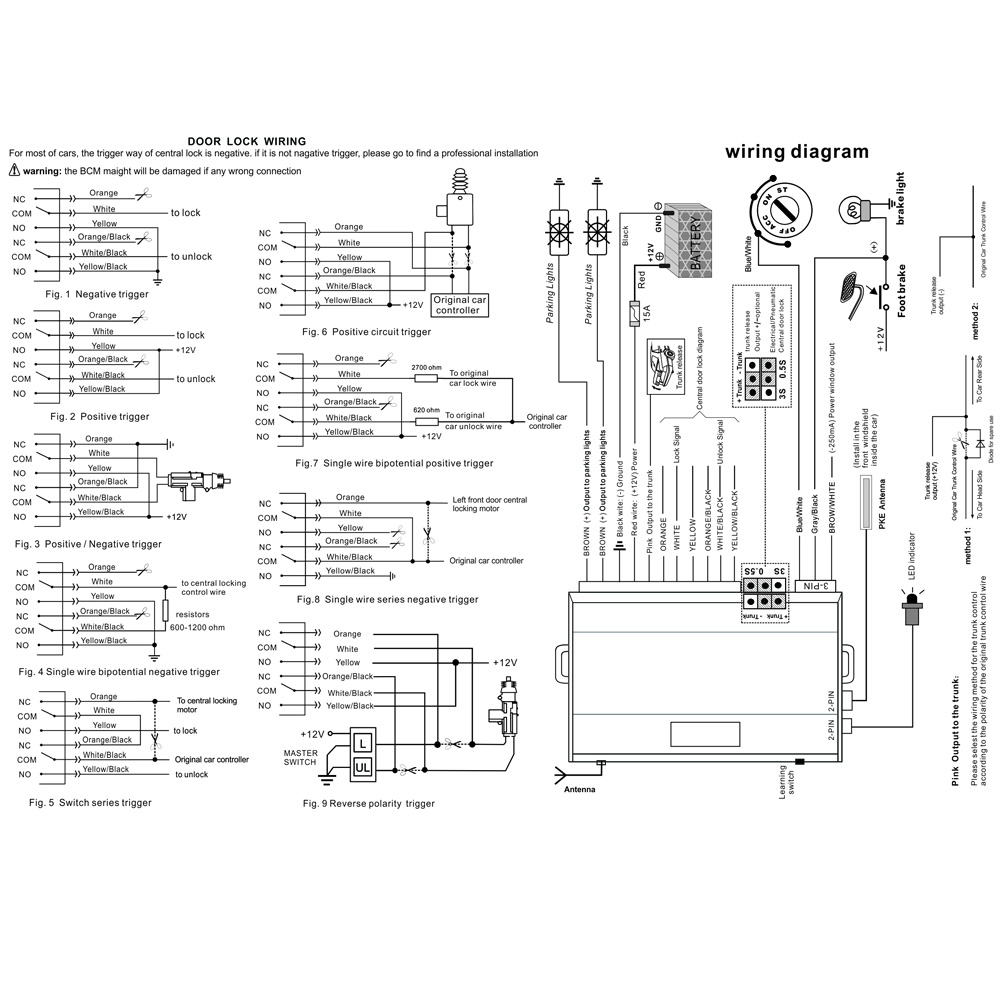
The included relay-based lock interface supports several common circuit types shown in the manual. Your installer must choose the matching diagram only after testing the actual lock system.

Negative / positive triggers

Common aftermarket door-lock control methods, including negative-trigger and positive-trigger circuits.

Single-wire and mixed circuits

Illustrated options for single-wire resistor and other special trigger configurations; compatibility depends on the specific vehicle circuit.

Actuator / reverse polarity

Relay diagrams include reverse-polarity motor control. Confirm motor current and relay ratings before connection.

Do not connect to CAN Bus data wires

The provided wiring diagrams are for conventional control wiring. They do not establish compatibility with factory CAN Bus-controlled locks. Do not identify wires solely by color; verify each circuit with a meter and suitable vehicle documentation.

Full wiring diagrams & operating instructions

Both pages of the supplied English manual are reproduced below. Tap either image to open the full-resolution version for closer inspection.

Full PKE installation wiring manual with door lock wiring diagrams and main unit connections
Page 1 · Main wiring & 9 door-lock configurations

Power, ignition-state, foot-brake, parking lights, trunk release, lock relays, antenna and optional signals.

Open full-size wiring diagram
Full PKE operation manual with remote buttons, passive entry, programming and technical specifications
Page 2 · Remote operation & configuration

Manual lock/unlock, PKE proximity behavior, enable/disable sequences, remote learning and specifications.

Open full-size operating instructions

Safety warning from the supplied manual

Incorrect wiring can damage the vehicle body control module (BCM). Have a qualified installer identify and verify all circuits before connection. These are general diagrams, not Jeep-specific or any other vehicle-specific pinouts.

Manual images are the original supplied documentation. Please contact support@efhips.com if you need help determining which conventional door-lock diagram applies to your existing controller.

Electrical & remote specifications

Main controller working voltage9–15V DC
Central lock output10A (manual rating)
Parking-light output5A × 2 (manual rating)
Trunk output+/− selectable; manual lists 10A
Window closing outputNegative signal, optional
Electric / pneumatic lock pulse0.5 s default / 3 s selectable
Remote frequency433.92 MHz
Remote batteryCR2032
Remote learningUp to 4 remotes
Approx. passive unlock range1.5–2 m (59–118 in per manual)
Approx. passive lock range3–5 m (118–196 in per manual)
Working temperature−30°C to +80°C (manual)

Ratings and distances are transcribed from the provided manufacturer documentation; verify vehicle circuit current and local radio regulatory requirements before installation or sale.

What comes in the kit

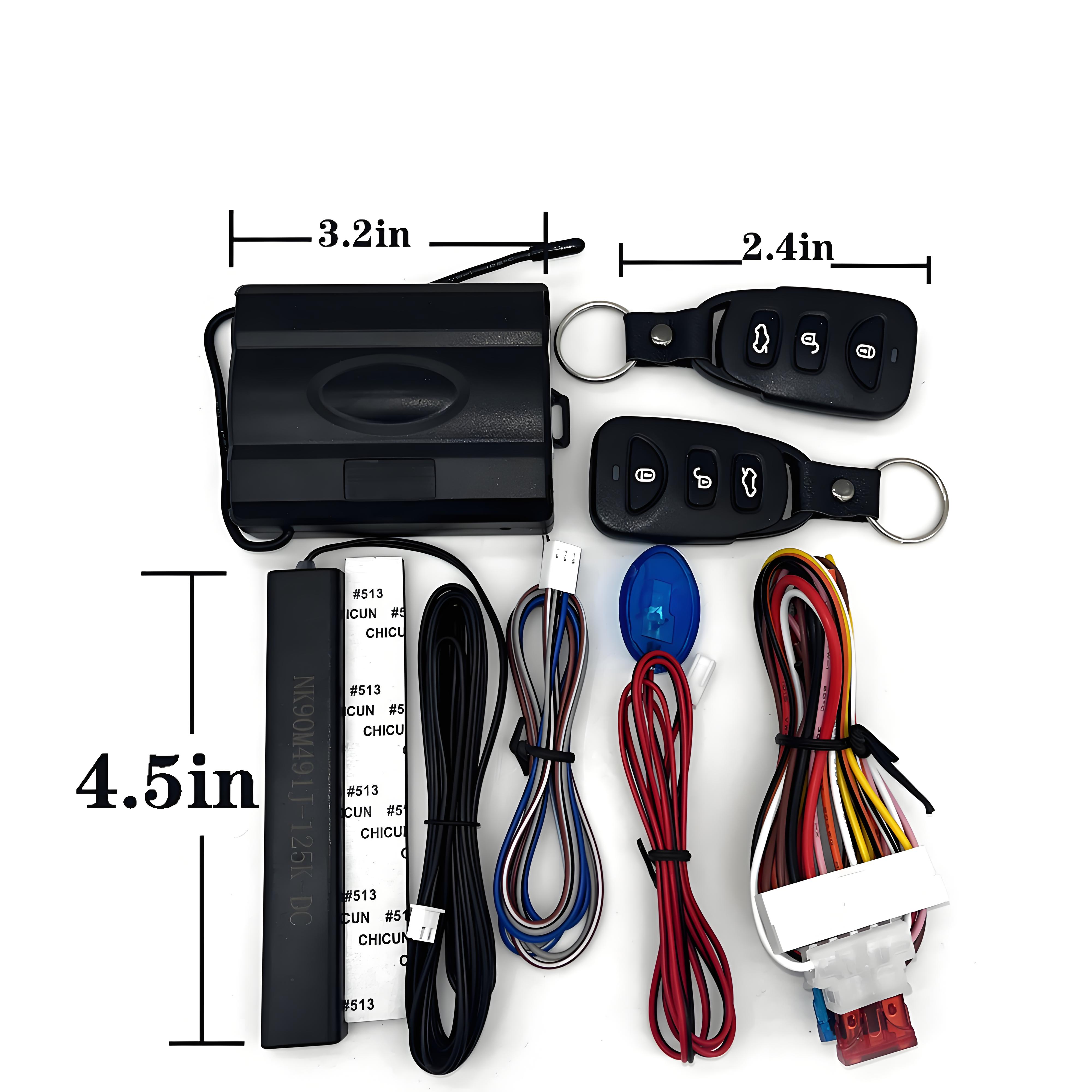
Full standalone PKE kit, including module, remote keys, antenna and wiringKit components and approximate main unit, remote and antenna dimensions

Included components

  • Main PKE control unit
  • Two smart remote keys
  • Detection antenna and indicator components shown in product photo
  • Main wiring harness and accessory wiring
  • English wiring and operating instructions displayed above

Not included / not promised

  • Vehicle door-lock actuators or a vehicle-specific harness
  • Factory CAN Bus interface module
  • Push-button start or remote engine start
  • Bluetooth phone app control is included only with the $69.90 Bluetooth version, not the $59.90 Standard version.
  • Guaranteed plug-and-play fitment for a particular vehicle

Confirm your existing door-lock setup

1. Identify your vehicle

Provide the year, make, model and whether your door locks are factory or aftermarket.

2. Identify the lock controller

Share the aftermarket controller model, actuator specifications, wiring diagram or clear connector photos.

3. Verify the trigger type

Confirm whether the lock system accepts negative, positive or another conventional control method. If unsure, ask a qualified installer.

Frequently asked questions

Will this work with a 2014 Jeep Wrangler and aftermarket door actuators?
It may work with a compatible conventional aftermarket door-lock controller or actuator wiring. Vehicle year and model alone are not enough to confirm fitment. Please send the actuator/controller brand, model and wiring diagram before purchase.
Does the system require a CAN Bus connection?
The supplied manual shows conventional power, ignition-state, door-lock relay and other signal wiring; it does not specify a direct CAN Bus data connection. Some vehicles still need an appropriate interface to control factory locks. Never connect the relay wires to CAN Bus data wires.
Can I keep using my original chip key?
Yes. This product does not replace the ignition system or the factory immobilizer. Your existing key remains responsible for starting the vehicle.
Does it include a push-start button or remote engine start?
No. This listing is for standalone passive keyless entry and central door-lock control, not engine start.
Which version supports smartphone app control?
Only the $69.90 Bluetooth PKE version supports local Bluetooth app control for door lock/unlock and trunk release (with compatible wiring). The $59.90 Standard PKE version does not include Bluetooth. Neither version supports engine starting.
Can I install it myself?
The controller requires vehicle-specific electrical wiring, including identifying the correct lock signal type and safe vehicle-state connections. Professional installation is recommended.
What if my vehicle uses pneumatic locks?
The manual shows a selectable 3-second pulse option for pneumatic central locking; confirm the rest of the wiring and relay compatibility before installation.
Are the door-lock actuators included?
No. The supplied kit photos show the controller, two remotes, wiring harnesses, antenna and indicator components, not vehicle door actuators.

EFHIPS 239 Passive Keyless Entry

Both versions include two remote fobs, automatic walk-up unlocking and walk-away locking, and conventional wired central door-lock control. Choose Bluetooth if you also want phone app control for door locking, unlocking and trunk release (when supported by the vehicle wiring).

SKU: EFHIPS-239
EFHIPS 239 Standard PKE kit

Standard PKE

$59.90 USD
Passive keyless entry without smartphone control.
  • Automatic proximity unlock and walk-away lock
  • Two remote fobs; remote lock/unlock and trunk-release output
  • No Bluetooth app control
SKU: EFHIPS-239-BT · Bluetooth
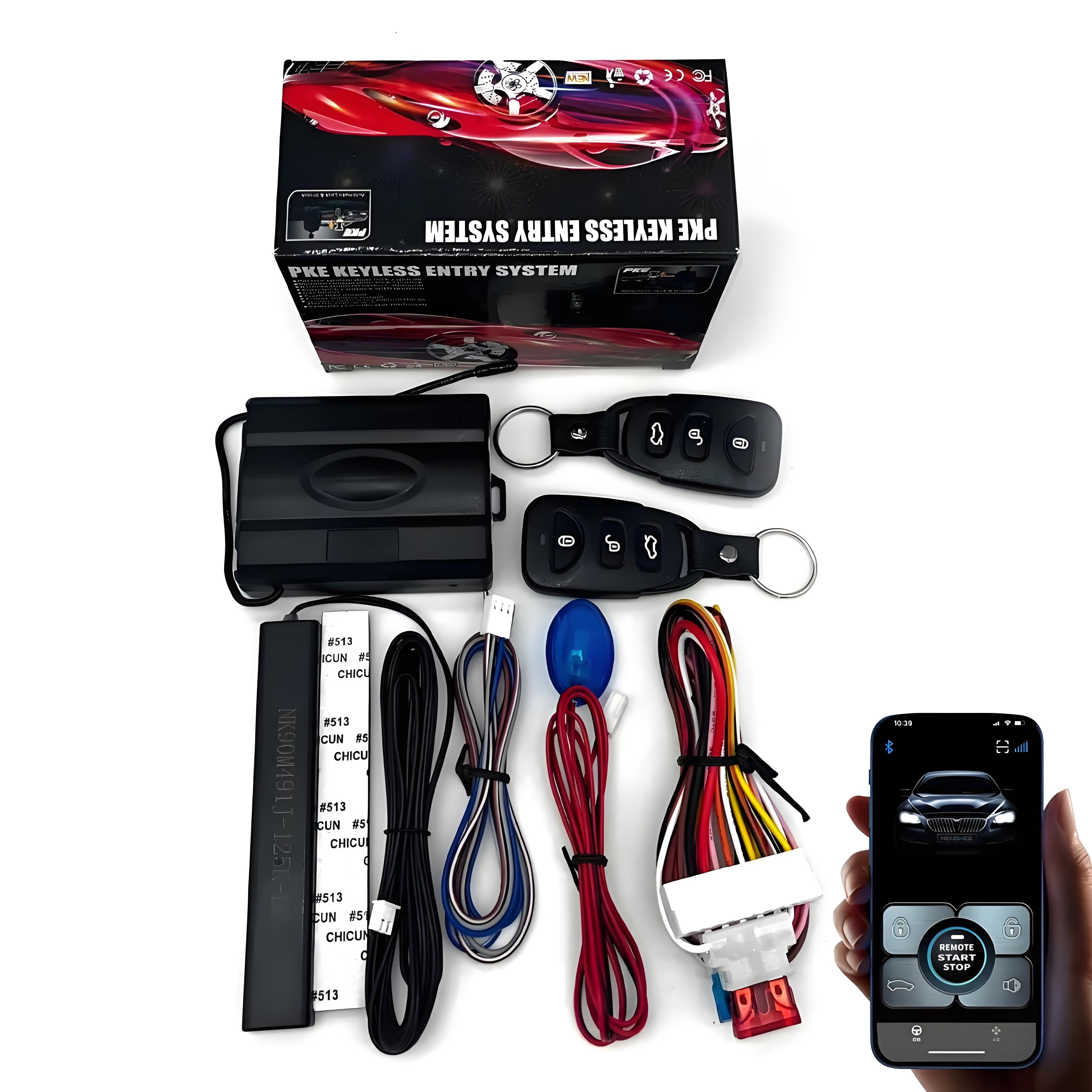
EFHIPS 239 Bluetooth PKE kit with phone app control

Bluetooth PKE

$69.90 USD
All Standard PKE features, plus Bluetooth phone app control.
  • Lock and unlock doors using the phone app
  • Open the trunk through the app when properly wired and supported
  • Bluetooth works within a limited local range; not internet remote control

Neither version includes push-button engine start or remote engine start. Vehicle compatibility and wiring must be verified before purchase.

PayPal processes checkout. Shipping fees, if applicable, are shown at checkout. Review Shipping Policy and Returns & Refunds.

From $59.90USD · Two versions
Choose Version